Archives April 2026

Part 6 –> ERP Implementation Framework:

⚠️ERP Design Technique: Where Projects Are Won… or Quietly Destroyed:

ERP is not configured.
It is designed.
And design is not about system.
👉It is about how your business will run tomorrow.

What is the Design Phase (Real Meaning)
The design phase is NOT:
– Drawing flow diagrams
– Copying current processes
– Listing screens & fields

The design phase is:
– Translating business strategy into executable ERP processes

It answers:
– How will we operate tomorrow?
– What will we stop doing?
– What will the system control?
– What decisions will be automated?

Why Design Phase is So Critical
Once design is locked:
– 80% of ERP outcome is already decided

If design is weak:
– Configuration becomes messy
– Customizations increase
– Costs go up
– Timelines slip
– Business loses trust

If design is strong:
– ERP stays standard
– Deployment is faster
– Adoption is smoother
– KPIs improve

What MUST Be Included in Design
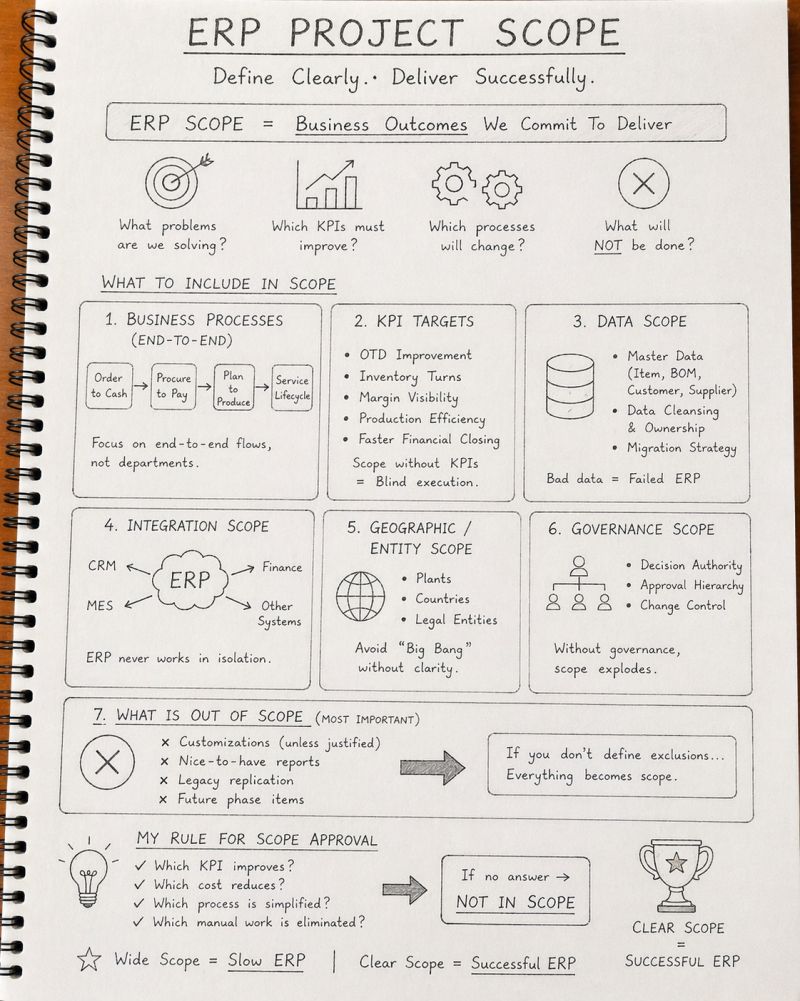
– End-to-end business processes (O2C, P2P, Plan → Produce)
– KPI alignment (OTD, Inventory, Margin, Cycle Time)
– Clear roles & ownership
– Decision logic (who decides what & when)
– Exception handling
– Data ownership & governance
– Integration touchpoints
– Business rules (approval, control, limits)

Design = Business + KPI + Control + Ownership

What You MUST EXCLUDE (Biggest Mistakes)
– “Nice to have” features
– User personal preferences
– Copy-paste of legacy system
– Early customization decisions
– Reports without business purpose
– Over-detailed technical design

If you include everything… you will deliver nothing.

The Brutal Truth
Most ERP designs fail because:
– Business is not involved
– Consultants don’t challenge
– Leadership wants everything
– No KPI ownership

So design becomes:
– Documentation exercise… not transformation

My Design Principle
Before approving any design, I ask:
Which KPI improves?
Which cost reduces?
Which manual step is eliminated?
Who owns this process?
If there’s no clear answer…
👉It doesn’t go into design.

#ERP#ERPDesign#DigitalTransformation#InforLN#CIO#ERPStrategy#BusinessKPIs#ERPImplementation#Leadership#ProcessTransformation#CloudERP
Discrete vs. Process Manufacturing: What’s the Difference in D365?

If you’ve ever scratched your head wondering what sets discrete and process manufacturing apart, you’re not alone. It’s a topic that comes up frequently in the world of Dynamics 365 Finance & Operations (D365 F&O). Hopefully after reading this blog, you’ll finally understand the differences. I’ve also slightly included setup / using production differences just in case that helps anyone out there.

Discrete vs. Process Manufacturing: What’s the Difference?

Discrete Manufacturing is all about making individual items or units—think cars, electronics, or furniture. The production is usually assembly-based, with each item produced separately and tracked by serial or lot numbers.

Process Manufacturing, on the other hand, deals with products that are made in bulk through a chemical or physical transformation process, such as food, chemicals, or pharmaceuticals. Here, the end product cannot be easily disassembled back into its raw materials. It’s more about recipes and formulas than assembly instructions.

Discrete Manufacturing Setup in D365 F&O

Setting up discrete manufacturing in D365 F&O involves a few critical configurations:

  1. Bill of Materials (BOM):
    • The BOM outlines all the raw materials, sub-assemblies, and parts needed to create the final product. It’s a hierarchical structure, allowing for complex multi-level assemblies.
    • You’ll define BOM versions to manage product variants or updates, tracking each change to ensure precise manufacturing.
  2. Routing:
    • Discrete manufacturing relies on routings, which define the sequence of operations and work centers (e.g., machining, welding, assembly). This helps track the time, resources, and costs associated with each step.
    • You can use job scheduling to plan the specific dates and times each production job will occur, ensuring alignment with inventory availability.
  3. Production Orders:
    • In D365 F&O, production orders are created and tracked for each batch or unit. These orders drive the manufacturing process, allowing you to control, monitor, and adjust production as needed.
    • You’ll have visibility into each step of the process, making it easy to track labor and material costs.

Process Manufacturing Setup in D365 F&O

For process manufacturing, D365 F&O offers specialized features tailored for continuous or batch-based production:

  1. Formulas:
    • Instead of BOMs, you work with formulas. These include ingredients and their quantities, along with co-products and by-products that might be generated during production.
    • The formula versioning in D365 F&O allows you to adjust ingredient ratios or switch out raw materials based on availability.
  2. Batch Orders:
    • Batch orders replace production orders here, focusing on mixing, blending, or chemical processing.
    • You can specify batch sizes and manage yield calculations, ensuring consistent output regardless of raw material variations.
    • D365 F&O also tracks the batch attributes, such as potency or chemical properties, which are crucial for industries like pharmaceuticals or food production.
  3. Resource Management:
    • Resources are defined to manage equipment, reactors, and tanks needed in process manufacturing. These resources often have specific capacities, making it critical to manage production constraints.
    • Process cells and resource groups help control production flow, making sure you don’t exceed the physical or chemical limitations of your setup.

Can You Use Both in a Company?

Absolutely! In fact, many companies have hybrid production environments where they leverage both discrete and process manufacturing to optimize their operations. Here’s how it can work:

  • Example Scenario: A company might manufacture both electronic devices (discrete) and the chemicals needed for their batteries (process). In this case, they can set up separate production areas in D365 F&O, each tailored to their respective requirements.
  • Key Considerations:
    • Inventory Management: Use item model groups to distinguish between discrete items and process-related materials. This way, D365 F&O knows whether to track by serial numbers or by batches.
    • Costing Methods: Discrete manufacturing typically uses standard costing or FIFO for item valuation, while process manufacturing might lean towards weighted average costing due to continuous blending.
    • Product Variants: With proper configuration, you can have different product variants that are processed differently. This allows for streamlined reporting and analytics, even when processes diverge.

By leveraging the flexibility of D365 F&O, companies can optimize their workflows and minimize manual interventions between discrete and process setups, allowing for seamless integration of both manufacturing types.

Industries Using Discrete Manufacturing

  1. Automotive:
    • Car manufacturers build vehicles using components like engines, seats, and electronic systems. Each component has a unique BOM, and production orders track the assembly process down to the individual vehicle.
  2. Electronics Manufacturing:
    • Companies making smartphones or computers rely on highly detailed BOMs and routing to ensure each unit meets quality standards. Serial numbers are used to track each device.
  3. Aerospace:
    • Aircraft manufacturers build complex machines using thousands of parts. Discrete manufacturing helps manage the assembly of engines, avionics, and other components, ensuring precise tracking and compliance with safety standards.

Industries Using Process Manufacturing

  1. Pharmaceuticals:
    • Drug manufacturing relies on specific formulas and stringent quality control to produce consistent batches of medication. Batch orders in D365 F&O allow for tracking of active ingredients and potency.
  2. Food & Beverage:
    • From brewing beer to producing packaged snacks, food manufacturers rely on formulas to create products. The ability to manage co-products (like spent grains in brewing) and track batches for quality control is crucial.
  3. Chemicals:
    • Chemical companies produce bulk quantities of products like cleaning agents, paints, and solvents. D365 F&O helps manage formulas, track chemical properties, and ensure compliance with safety standards.

什么是 Dynamics 365?

Dynamics 365 提供 AI 支持的 ERP 和 CRM 应用程序,以帮助你更好地管理销售、服务、财务和供应链运营。单独或联合使用它们来连接团队、流程和数据,以提高效率和获得新的见解。